
In short
- Link each source to the section or chapter that uses it.
- Note the page number for every quote and specific point.
- Keep a simple table, a synthesis matrix, to see which sources cover which themes.
- Before you hand in, check that every citation has a reference, and drop sources you didn’t use.
A reference list that doesn’t match the text is one of the most common things markers pick up. It happens when sources live in one place, the writing in another, and the page numbers nowhere. Linking each source to the chapter that uses it closes the gap.
This is step 6 of planning an assignment from start to finish. You’ll need your saved sources from step 3 and your chapters from step 5.
Why it matters
- Nothing goes missing. Every citation in the text has its reference, and the other way round.
- Page numbers are there when you need them, not lost in a pile of PDFs.
- Your argument gets clearer. Seeing which sources sit in which chapter shows where the evidence is thin.
- Supervisor questions are easy. “Where did this come from?” takes seconds to answer.
A synthesis matrix
A literature review isn’t a list of summaries; it groups sources by theme and compares them. A simple table helps you see the themes. Here’s one for the dissertation example in this guide:
| Source | Screens and sleep | Teenagers’ body clocks | Method |
|---|---|---|---|
| Hale and Guan (2015) | Review of many studies, p. 52 | ||
| Chang et al. (2015) | eReaders delay sleep, p. 1234 | ||
| Walker (2017) | Later body clocks, p. 81 | ||
| Bryman (2016) | Interviews, p. 584 | ||
| Braun and Clarke (2006) | Thematic analysis, p. 87 |
The page numbers in this example are for illustration.
Read across a row to see what one source gives you. Read down a column to see what you know about a theme, and where you need more.
Link sources to chapters, step by step
Open the chapter’s card
Each section or chapter has its own card, from step 5.
Add the sources it uses
Pick them from the board’s Sources stack, or drag a source from the stack onto the card.
Add the page number
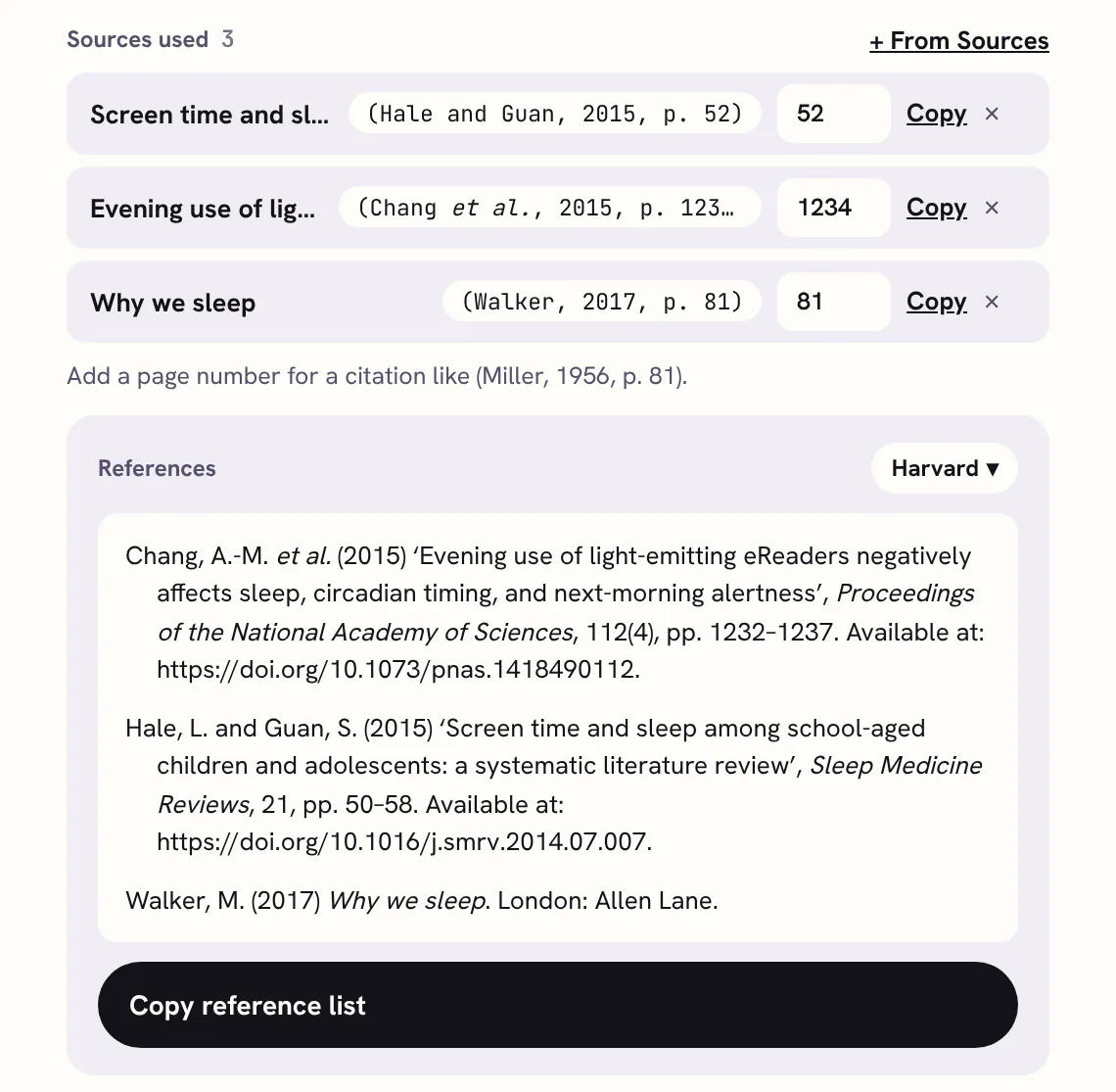
For each quote or specific point. The in-text citation updates to match, like (Hale and Guan, 2015, p. 52).
Copy citations as you write
Copy the citation straight into your document, so it’s right first time.
Copy the chapter’s reference list
Each card builds its own list, in your style. Copy it for a draft you’re sending to your supervisor.
Check what’s left
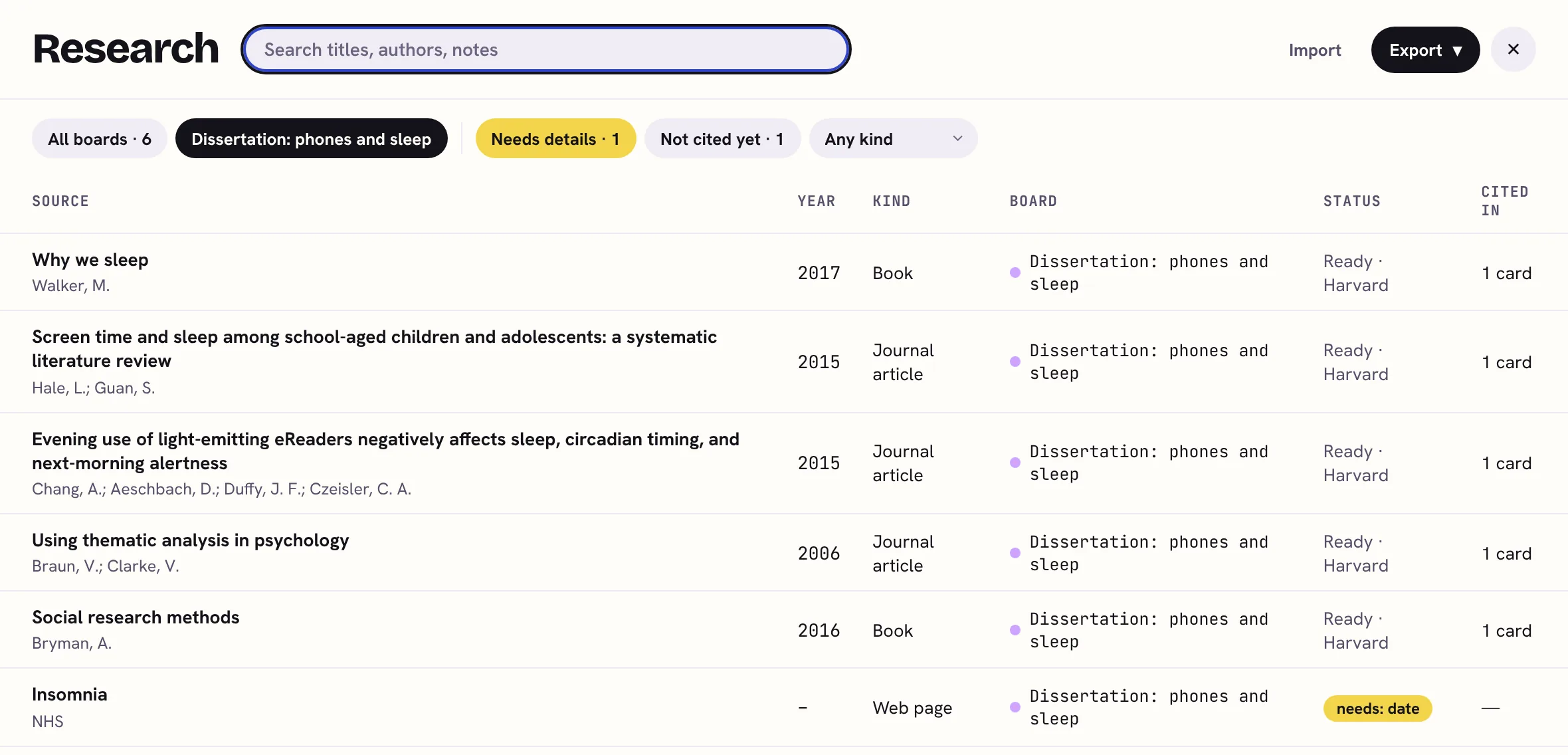
Before you hand in, look for sources you saved but never cited, and for anything missing details.
Check nothing’s missing
Two quick checks before you hand in. First, every source you cite is in your reference list, with every detail your style needs. Second, everything in your list is cited somewhere. Sources you read but didn’t use don’t belong in a reference list (though a bibliography may include them, if your style uses one).
 Sources for each chapter in KanBananza
- Sources used on every card: press + From Sources or drag a source onto the card. Each row has a page box, the live citation and Copy. Full Bananza
- Below them, the card’s own References (or Bibliography in footnote styles) and Copy reference list, which pastes into Word or Google Docs with italics and hanging indents. Full Bananza
- On the board, a chip like 3 sources shows which chapters have sources; press it for Copy for this card. Full Bananza
- The Research library shows every source, how many cards cite it, and filters for Needs details and Not cited yet. A source’s own details show Cited in and which cards. Full Bananza
- On the free plan: keep the Sources stack and copy the whole list from it in Harvard, and note which sources each chapter uses in the card’s notes or checklist. Free

For your level
School and college
Keep a list of sources for each part of your coursework or EPQ. Markers look for a reference list that matches the text, and it’s easy marks.
University essays and reports
One card per main section, with its sources linked. When you redraft a section, its sources come with it.
Dissertations
The literature review uses the most sources, so build its synthesis matrix early. The methodology’s sources are usually research methods books.
Master’s and PhD
Over a long project, the same source shows up in several chapters. Seeing every chapter that cites it helps you keep what you say about it consistent.
Questions
What is a synthesis matrix?
A table with your sources down the side and your themes or chapters across the top. You tick, or note a page number, where each source fits. It shows where sources agree, where they don’t, and which themes need more reading.
Should each chapter have its own reference list?
Usually there’s one reference list at the end of the whole piece. Some theses and edited books have one per chapter. Your handbook says which. Keeping each chapter’s sources linked helps either way.
What if I cite the same source in two chapters?
Link it to both. It still appears once in the full reference list. In KanBananza, the Research library shows how many cards cite it, like “Cited in 2 cards”.
How do I find sources I saved but didn’t use?
Compare your saved sources with your citations. In KanBananza’s Research library, the Not cited yet filter shows them in one click, so you can use them or let them go.
Can I do this for free?
Yes: keep the Sources stack (free) and write which sources each chapter uses in that chapter card’s notes or checklist. Linking sources to cards, with page numbers and each card’s own reference list, is part of Full Bananza.
All 7 steps
- Break down the brief
- Plan back from the deadline
- Find and save sources
- Reference as you go
- Plan the chapters
- Sources for each chapter
- Write, check and hand in
KanBananza is free for Chrome, Edge and Firefox. No account, no tracking, and every accessibility option included.
Add to Chrome, it's freeAlso for Edge and Firefox. Full Bananza from £5 a year, or try it free for 7 days.