
In short
- Start with your reading list, then your library’s search and the databases for your subject.
- Search with keywords and their synonyms, and use AND, OR and "quotes" to narrow it down.
- Check each source: who wrote it, where it was published, when, and what evidence it gives.
- Save every source the moment you decide to use it, with its details and page numbers.
- Keep quotes in quotation marks with their page, so you never copy by accident.
Most referencing pain comes from one habit: reading now and saving details later. Later, the tab’s gone, the page number’s forgotten and the quote has no source. Save as you go, and the reference list nearly writes itself.
This is step 3 of planning an assignment from start to finish.
Where to look
Your reading list
Your tutor chose these, so they’re the safest start. Their reference lists lead you to more.
Your library’s search
It searches books, e-books and many journals you can read for free as a student. Sign in so the full text opens.
Google Scholar
Good for finding academic work fast. Link it to your library (in Scholar’s settings) so you can open what your library pays for.
Your subject’s databases
Deeper and better filtered than a general search. The table below has the usual ones.
Follow the trail
Look backwards through a good source’s reference list, and forwards with “cited by” in Google Scholar to find newer work that used it.
| Subject | Where to search |
|---|---|
| Psychology | APA PsycInfo, PubMed |
| Medicine, nursing and health | PubMed (MEDLINE), CINAHL, the Cochrane Library, NICE guidance |
| Education | ERIC, British Education Index |
| Law | Westlaw, LexisNexis, BAILII (free), legislation.gov.uk (free) |
| Business and management | Business Source Complete, company and industry reports |
| Engineering and computing | IEEE Xplore, ACM Digital Library, Scopus |
| Sciences and social sciences | Web of Science, Scopus |
| Humanities | JSTOR, Project MUSE |
| Statistics | Office for National Statistics, GOV.UK statistics |
Which databases you can use depends on your school or university’s subscriptions. Your library’s subject guides list them.
Search smarter
- Keywords and synonyms: list your topic’s key words and other words for them. Screen time, screen use, digital media.
- AND narrows, OR widens:
"screen time" AND sleep AND (adolescents OR teenagers). - Quotation marks keep a phrase together:
"screen time". - An asterisk finds word endings in most databases:
adolescen*finds adolescent, adolescents and adolescence. - Filters: date range (the last ten years, if the brief asks), peer reviewed, language and subject.
Is it a good source?
A quick test, often remembered as CRAAP: Currency (is it recent enough?), Relevance (does it answer your question?), Authority (who wrote it, and are they qualified?), Accuracy (is it based on evidence, and was it reviewed?) and Purpose (is it informing, or selling or persuading?).
- Best: peer-reviewed journal articles, academic books, systematic reviews, official statistics and guidelines.
- Useful with care: reports from charities and think tanks, reputable news, professional bodies. Note who funded them.
- For background only: encyclopedias, revision sites and blogs. Use them to understand, then find the original sources.
Save as you go
When you decide a source is useful, save it straight away with everything you’ll need for the reference. Each kind of source needs different details, and step 4 lists them. Alongside the details, keep:
- Why it matters: one line, like “big review: screens before bed delay sleep”.
- Quotes, word for word, in quotation marks, with the page number.
- Your own notes kept apart from quotes, so you never paste someone else’s words as yours.
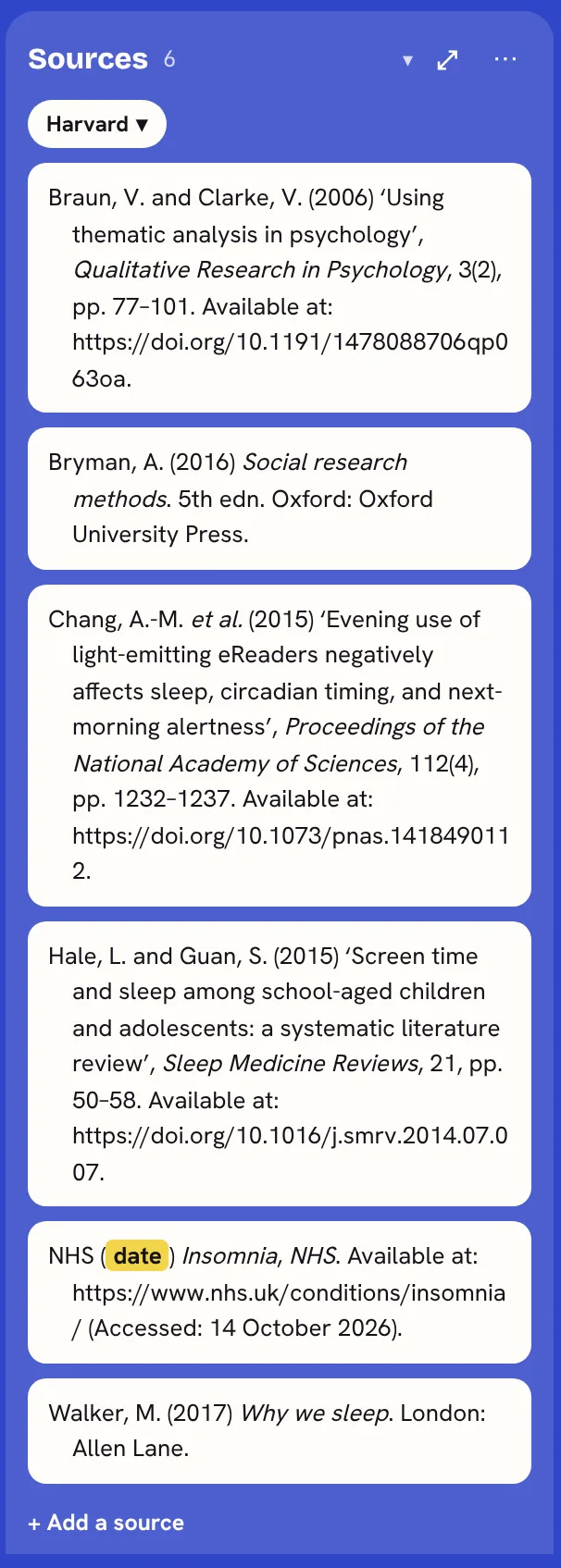
 Save sources in KanBananza
- Add a Sources stack beside your board: + Add a stack, then Sources. Every source for that board lives there. Free
- On any web page, right-click and choose Save as a source. KanBananza reads the page’s own details (title, authors, date) on your computer; nothing is sent anywhere. It knows journal articles, books, reports, news, videos, legislation.gov.uk, UK cases, PubMed, NICE, GOV.UK and more. Free
- Or press + Add a source and paste a link, a DOI or an ISBN, or type a title. Free
- With Full Bananza, a DOI or ISBN is looked up for you (from Crossref and Open Library) and fills in the details. Full Bananza
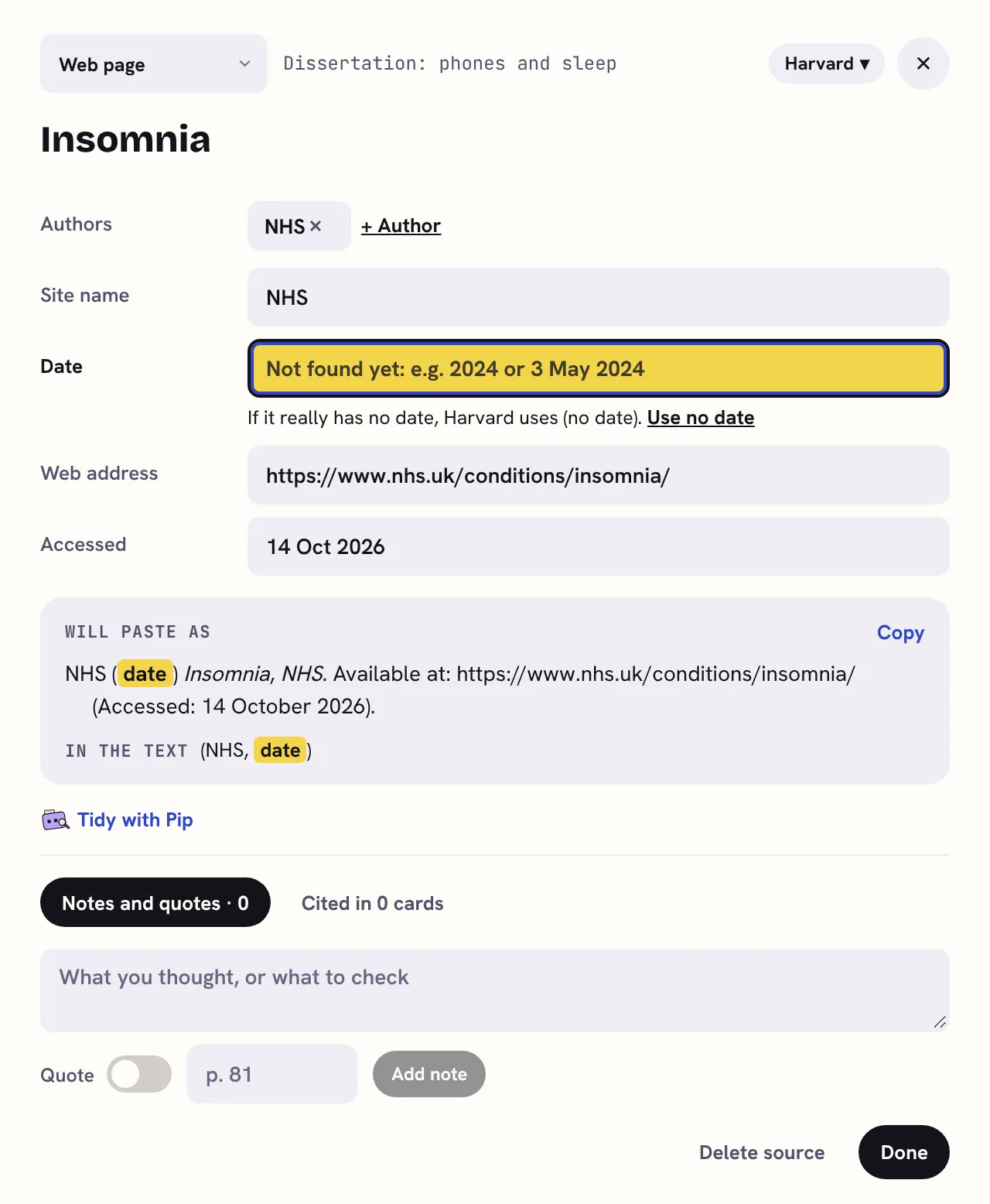
- Missing details are highlighted, and the source shows what it still needs, like needs: date. Save the same page twice and it says Already saved. Free
- Each source keeps Notes and quotes, with a page number for each and a switch to mark a quote as a quote. Free
- A PDF open in the browser can’t be read, so you’ll be asked what kind of source it is and can add the details by hand.
For your level
School and college
Revision sites are fine for learning, but cite books, articles and the sources your teacher recommends. For the EPQ, keep a note of where and how you searched: it belongs in your production log.
University essays and reports
Start with the reading list, then aim for a few recent journal articles of your own. Markers notice when you’ve gone beyond the list.
Dissertations
Keep a search log: the databases, the search words and the dates you searched. It makes the methodology chapter easier to write.
Master’s and PhD
For a systematic or scoping review, plan your searches with your librarian. You can export your sources to a reference manager whenever you like.
Questions
How many sources do I need?
Follow the brief first. Without a number, a common rule of thumb is around one good source per 100 to 200 words: so ten to twenty for a 2,000-word essay, and many more for a dissertation. Quality and relevance matter more than the count.
Can I use Wikipedia?
It’s a fine place to start understanding a topic and to find sources in its reference list, but don’t cite it in academic work. Follow its references to the original sources, read those, and cite them.
How do I know if a source is peer reviewed?
Journal articles usually are, but check: the journal’s website says so, and library databases have a peer-reviewed filter. Books from academic publishers are reviewed too. Web pages, news articles and most reports aren’t.
Can I cite a lecture or lecture slides?
Many courses allow it, but most prefer you to cite the sources the lecture used. Check your handbook. If you do cite slides, your referencing style has a format for them.
What if I can’t find a date or an author?
Look harder first: the bottom of the page, the “about” page, or the PDF’s first page. An organisation can be the author. If there’s really no date, your style has a way to say so, like “no date” in Harvard or “n.d.” in APA.
All 7 steps
- Break down the brief
- Plan back from the deadline
- Find and save sources
- Reference as you go
- Plan the chapters
- Sources for each chapter
- Write, check and hand in
KanBananza is free for Chrome, Edge and Firefox. No account, no tracking, and every accessibility option included.
Add to Chrome, it's freeAlso for Edge and Firefox. Full Bananza from £5 a year, or try it free for 7 days.